Managing your Account
The Account page is where you manage your profile, plan, AI usage, and billing-related actions. Open it from the navigation drawer (Account) or from your profile menu. The page subtitle is Manage your profile, plan, and AI credits.
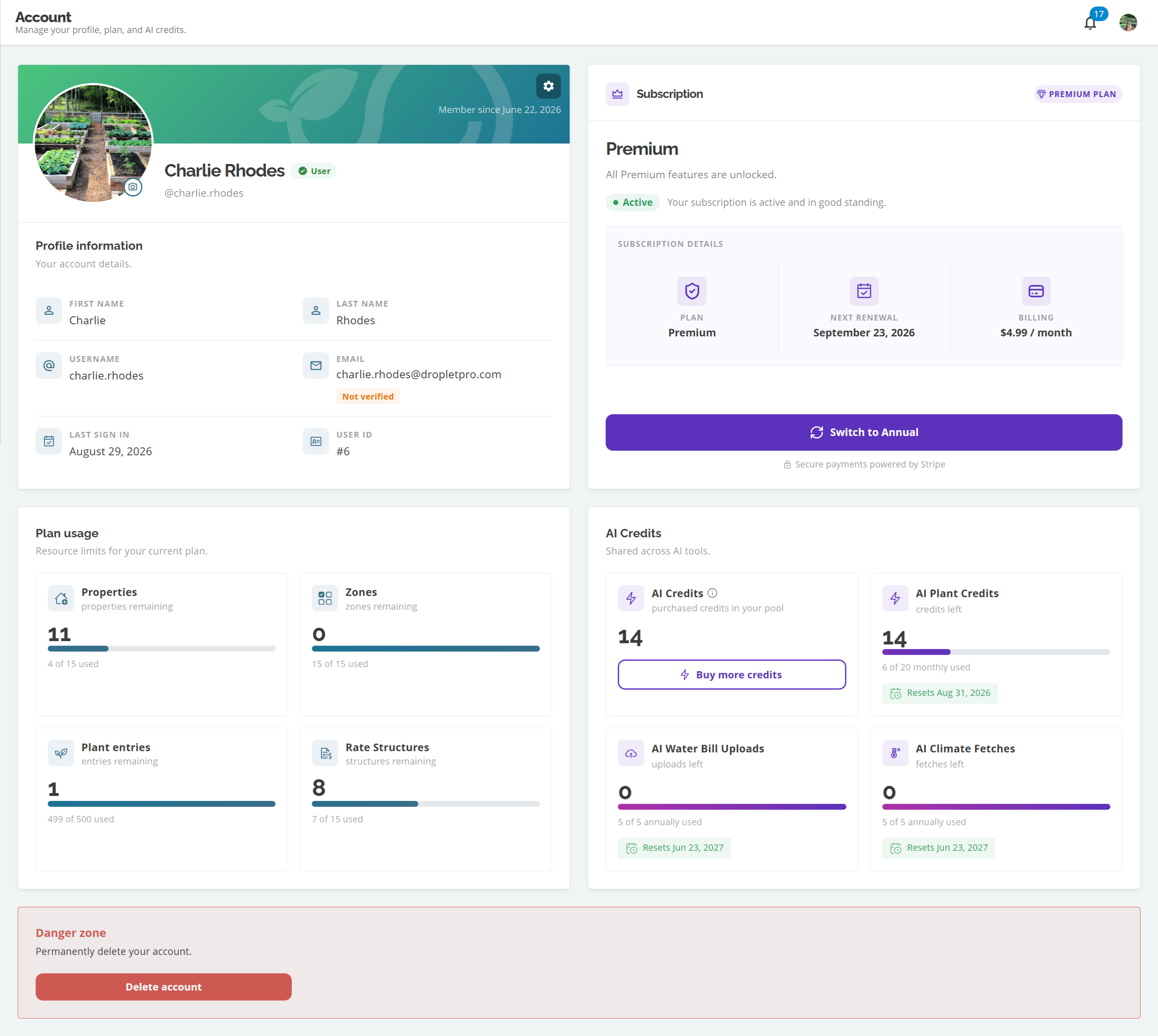
Account page overview
What you will find on Account
Profile information card: header with avatar, display name, plan chip, member-since date, and a settings icon that opens Account actions; profile fields for name, username, and read-only email
Account actions menu: Edit profile, Change password, and for Premium users also View invoices, switch billing cycle, pause/resume/cancel, and Apply promo code
Subscription card: on Free, Upgrade to Premium; on Premium, plan status, billing details, and a shortcut button (View invoices, Switch to Annual or Monthly, Resume subscription, or Cancel pending pause, depending on status)
Plan usage: Properties, Zones, Plant entries, and Rate structures with live used/limit counts for Free and Premium
AI Credits: included plant, climate, and water-bill allowances plus the purchased pool
Danger zone: permanently Delete account (requires typing your email to confirm)
Where subscription actions live
Pause, cancel, and Apply promo code are in the Account actions menu (settings icon on the Profile information card). View invoices, billing-cycle switches, Resume subscription, and Cancel pending pause are in Account actions or on the Subscription card shortcut button, depending on your plan status. Free accounts use Upgrade to Premium on the Subscription card. Account deletion is under Danger zone, not Account actions.
Related guides
Common questions
Can I change my email on the Account page?
Not right now. Email is read-only on Account (with a verified status). This may change in a future update. Contact support if you need help. See Editing your profile.
Where do I buy more AI Credits?
On the AI Credits pool card, use Buy more credits when you are on Premium. See Purchasing AI Credits.
Related articles
Editing your profile
Changing your password
Upgrading to Premium
Applying promo codes
Viewing invoices and billing options
Deleting your account
Was this helpful?
If you still have questions, contact us and we'll help you out.