Viewing invoices and billing options
Premium subscribers can review invoices and change billing frequency from the Account page. Open Account actions from the settings icon (gear icon) on the Profile information card, or use the Subscription card shortcut button when it shows View invoices or Switch to Annual / Switch to Monthly. These tools are not in a separate Stripe customer portal inside the app.
View invoices
On Account, open Account actions from the settings icon (gear icon) on the Profile information card, then choose View invoices. You can also click View invoices on the Subscription card when that is the active shortcut button. The Billing & Invoices dialog lists invoices from your subscription (or shows No invoices yet). Open or download a PDF when those options are available for an invoice.
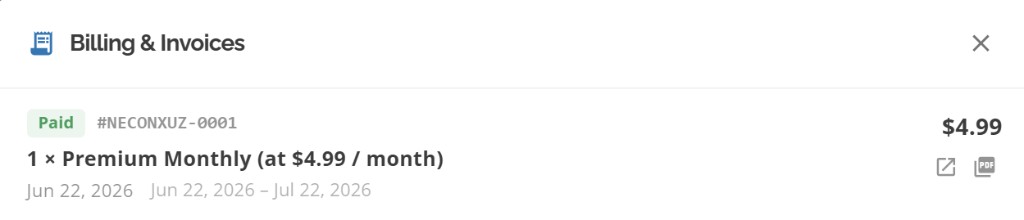
Billing & Invoices
Switch between monthly and annual
In Account actions, choose Switch to Annual or Switch to Monthly when the option is available. The Subscription card may show the same switch when that button is active. Confirm the change in the dialog. A pending switch can show a banner with the effective date and Cancel this change if you need to undo it before it applies.
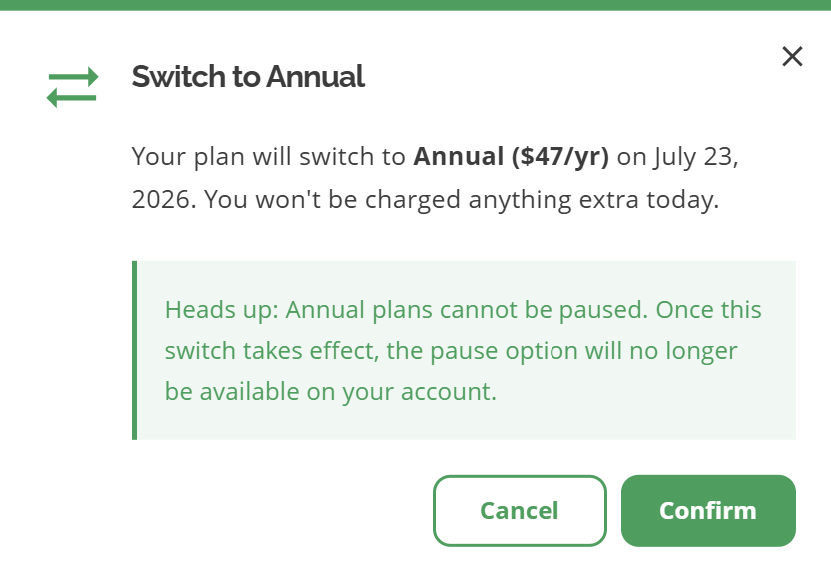
Switch to Annual confirmation (monthly plans)
Paused subscriptions
Some billing actions are unavailable while paused or while a pause is pending. Resume or cancel the pending pause first if Switch to Annual / Monthly is disabled. See Pausing Your Subscription.
Other billing actions on Account
Upgrade to Premium from the Subscription card when you are on Free
Apply promo code for an active Premium subscription
Cancel subscription or Pause subscription from Account actions (gear icon)
Buy AI Credits from the AI Credits pool card
Common questions
Is there a Stripe customer portal in Account?
Not in the current app. Invoice viewing, billing-cycle changes, promo codes, pause, and cancel are handled with in-app Account actions and Stripe Checkout for upgrades and credit purchases.
Where do I update my card?
Card entry happens on Stripe Checkout when you upgrade or buy credits. For ongoing card updates, use the payment options Stripe provides during checkout or contact support if you cannot complete a renewal. See Is my payment information secure?.
Related articles
Upgrading to Premium
Applying promo codes
Canceling Your Subscription
Pausing Your Subscription
Is my payment information secure?
Was this helpful?
If you still have questions, contact us and we'll help you out.