AI Plant Assistant
The AI Plant Assistant (Premium) helps you identify plant details and generate weekly watering recommendations in gallons. You can analyze up to 6 plants in a single request, and that request uses 1 included plant request (or 1 purchased AI credit after included is used up).
Premium required
Plant AI suggestions are a Premium feature. Free accounts can still enter gallons-per-week values manually on any plant. To unlock AI, Upgrade to Premium.
Open the AI Plant Assistant
On Plant Management, open Add Plant and choose AI Suggestions, or start the AI flow from the plant tools available on that page. Make sure the correct property and zone context are selected.
Enter up to 6 plant names
Add common names (or species) for the plants you want analyzed. You can include up to 6 plants in one request. For each plant, you can mark Is this a tree? and enter age and size class, or choose a Watering approach: Single Plant (age and growth) or Planting Area (sq ft). Completing that batch still uses only 1 included request (or 1 purchased credit after included is used up).
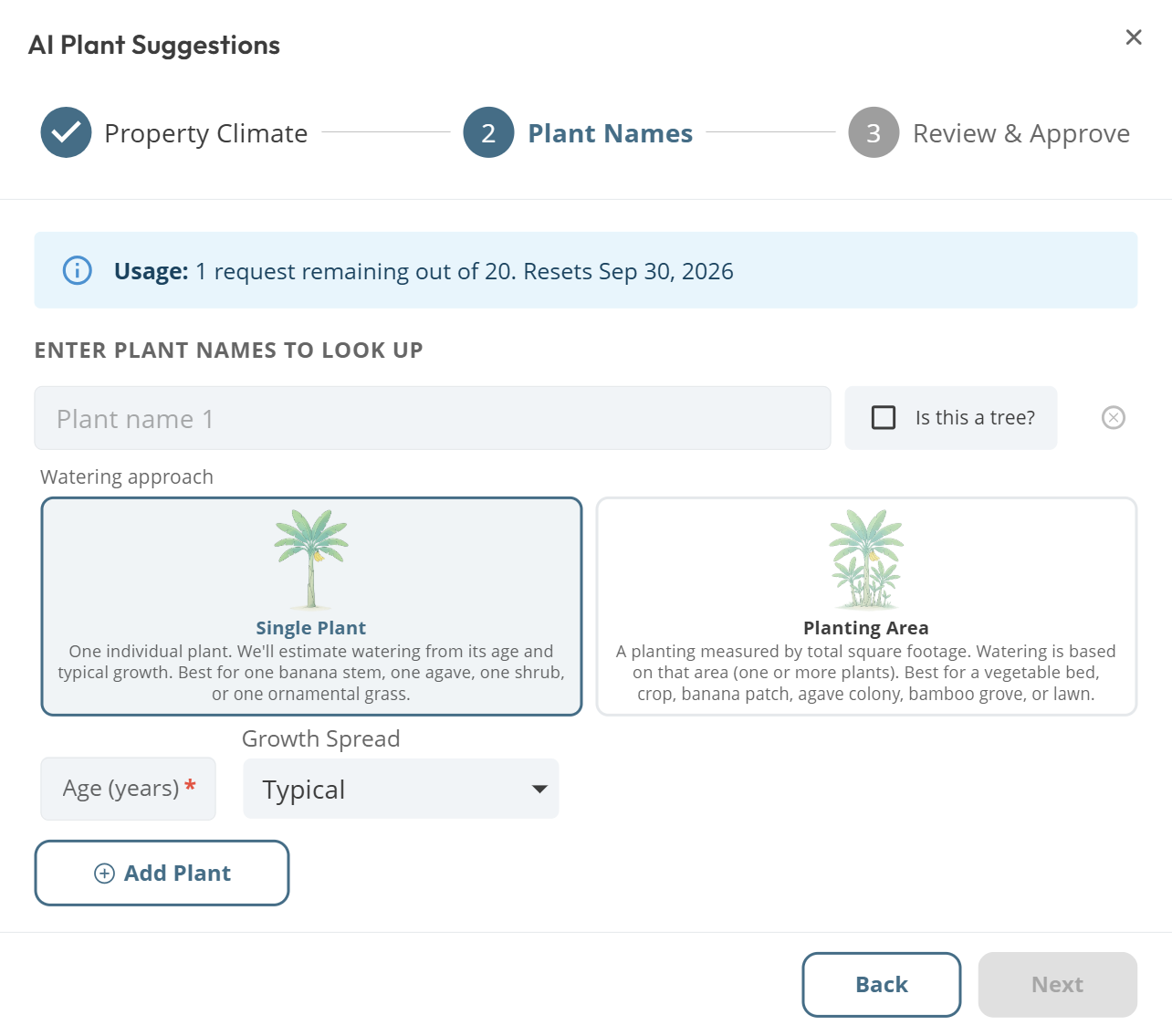
AI Plant Suggestions. Enter plant names, then choose Watering approach or mark trees
Batch tip: 6 plants, 1 credit
If you are setting up a new zone, enter several plants together instead of running one request per plant. That stretches your included monthly plant allowance further.
Provide climate temperatures if needed
If the property does not yet have seasonal average daytime high temperatures, the assistant may ask you to fetch them first. Climate fetches use a separate included annual allowance, then purchased credits from the shared pool (see Understanding AI Credits).
Complete follow-up details if asked
After analysis runs, dropletPRO may open follow-up dialogs such as Help us classify your plant, Trees Detected (age and size class), or Planting area required. These finish watering inputs and do not require another AI request.
Review and accept
Review the suggested plant details and gallons-per-week values. Accept the plants you want to keep, or edit values before saving. Closing without accepting still consumes the plant request used when the analysis ran.
What Retry does
Retry asks the assistant for updated plant metadata and classification. For most plant types, watering gallons are calculated by dropletPRO's watering engines (not a fresh AI guess), so retry is useful when identification looks wrong. It is not a way to roll new AI watering numbers for engine-backed plants.
Credits are consumed when the analysis runs
An included plant request (or 1 purchased credit after included is used up) is used when the suggest request runs, not when you accept. If you leave without saving, the credit is still consumed.
If zone environment settings change later, plants may show a stale watering banner. Use AI Plant Re-evaluation (Re-analyze with AI) to refresh those recommendations.
Common questions
How many plants can I analyze at once?
Up to 6 plants per request. That entire batch uses 1 included request (or 1 purchased credit after included is used up).
Do classification or planting-area follow-up dialogs use another credit?
No. Dialogs such as Help us classify your plant, Trees Detected, and Planting area required finish watering inputs after the suggest request. They do not spend another included plant request or purchased credit.
Can I manually enter a watering value without using the AI?
Yes. You can enter or edit the gallons-per-week value directly on any plant without running the AI assistant. This works on Free and Premium.
How many AI credits do I get?
Premium includes a monthly plant-request allowance shown on Account. After that is used up, plant AI spends 1 credit from the AI Credits pool. Check Account for your current balances and reset date.
Related articles
Understanding AI Credits
AI Plant Re-evaluation
How dropletPRO Calculates Watering
Was this helpful?
If you still have questions, contact us and we'll help you out.